What's New on Embodia: September 2026
By: Embodia Team ∙ Estimated reading time: 5 minutes
By: Embodia Team ∙ Estimated reading time: 5 minutes
Make Embodia Fit the Way You Work
Most of what we released this month has the same theme: letting you shape Embodia around your practice, instead of the other way round.
You can connect it to your own website, write your own AI charting prompts, and lock a questionnaire once a patient has submitted it.
We've also added time zones for Alberta and British Columbia, since neither province is falling back this November.
There's also a new 7-day free trial on the Practice Management plan. If you're already a member, this is the one to send to the colleague who keeps asking what you use. Plus, if your clinic is on Tier 3, sharing your referral code takes $20 off their first month and $20 off your next one.
New this month:
- Free 7-day trials on the Practice Management plan
- Clinic API: connect Embodia to your own website and tools
- More flexibility with AI Charting prompts
- Feature improvements: clinic portal logo, questionnaire locking, and new Alberta and B.C. time zones
- New in the exercise library: unilateral cable exercises for the shoulder
- New in the patient education library: OAB, prolapse, and osteoporosis
Free Trials are here!
We're now offering a 7-day free trial on our Tier 3: Practice Management plan.
- Full access to every tool included in the Practice Management plan*
- Step-by-step set-up video and checklist
- Everything you set-up and add will be saved
- Sign up at any time via your account settings
- Onboarding & migration support when you start your trial
No commitment, and no credit card required.
The tools you can explore
-
Charting & EMR: Templates and SOAP notes, customizable to your practice
-
Scheduling Tools: Waitlists, reminders, online booking, group classes, and more
-
Billing & Invoicing: Payments, superbills, US clearing house integration, Canadian direct billing
-
HEP & Patient Ed: 4500+ video exercise library, patient resources, and the ability to add your own
-
Communications: HIPAA-compliant telehealth, messaging, email notifications, and optional SMS
-
Diaries & Questionnaires: Digital patient diaries, plus outcome measures with analytics
-
Clinic-branded Patient App: Your clinic's brand, not ours, right down to the app icon
- Integrations: Connect the tools you already use, like Google Calendar and Stripe, to get the full experience
*The only exception: While AI Charting and AI DocBuilder are not included in the trial, they both come with generous free credits to try out once you sign up!
Just create your account, select a Clinic Membership account type, and follow the prompts to get to your trial!
Start your free trial →
Clinic API: Connect Embodia to your own tools
How it works
Plenty of clinics run a website they'd rather keep patients on. Until now, sending someone from that site into Embodia meant handing them off to a separate booking page.
A Clinic API key lets another application, your clinic website, a custom booking widget, an internal tool, talk directly to your Embodia account without anyone logging in.
That application can list your practitioners, list the clinic addresses and services that accept online booking, check available time slots for a given day, and submit an online booking request on a patient's behalf.
Your existing workflow doesn't change, the request just arrives from somewhere else!
To be clear, a booking request doesn't create the appointment directly. It notifies your clinic that a patient wants to book, exactly the same way a request through your online booking page would.
Managing your API keys
Keys are created and managed under Settings > API keys:
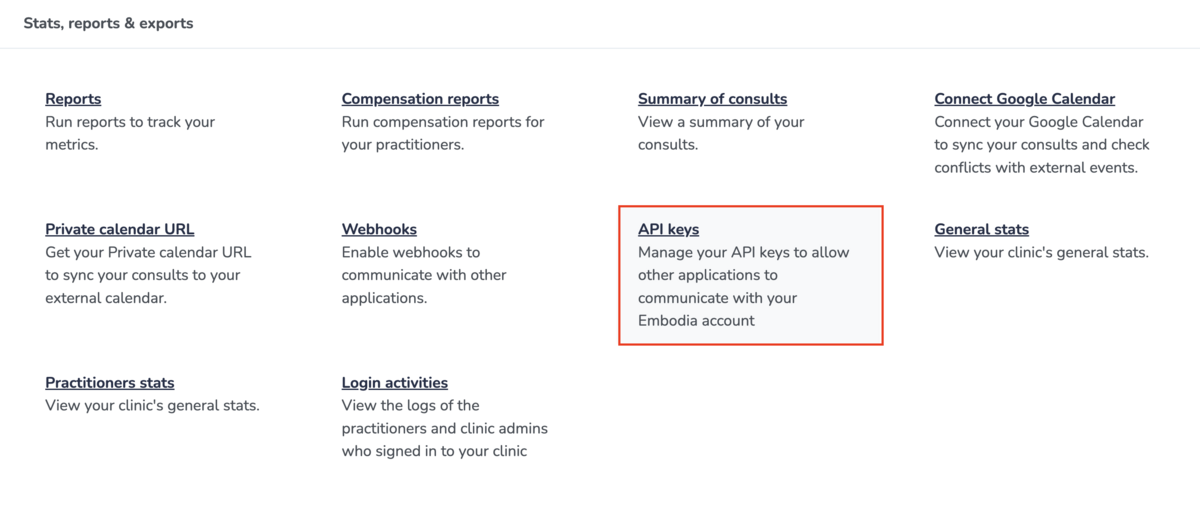
Once your API key(s) are set up, your list shows when each key was last used, which makes it easy to spot ones you can safely remove.
Deleting a key deactivates it immediately, so anything still using it stops working right away.
IMPORTANT: Treat the key itself like a password. Don't share it publicly or embed it in front-end code, since anyone holding it can act as your clinic through the API!
🔒 Requires an active Tier 3: Practice Management membership. Managing API keys also requires Manager permission on your clinic.
Learn more about Clinic API keys to connect other applications →
AI Charting: Prompt Updates
Embodia's default AI Charting prompts are deliberately conservative, and they work well for most clinics. But, no two practices document identically.
A pelvic health clinic and a sports rehab clinic capture different findings, use different terminology, and structure their notes differently.
Embodia now gives more flexibility for prompts, as well as adding your own custom vocabulary.
The general prompt
The general prompt sets the role the AI is playing, the setting it's documenting, and the rules it follows across every chart entry your clinic generates.
Because it applies across the whole clinic, the general prompt is set by the clinic manager rather than by individual practitioners.
To customize, go to Charting > AI Charting and select Configure. The current default is displayed above the field for reference.
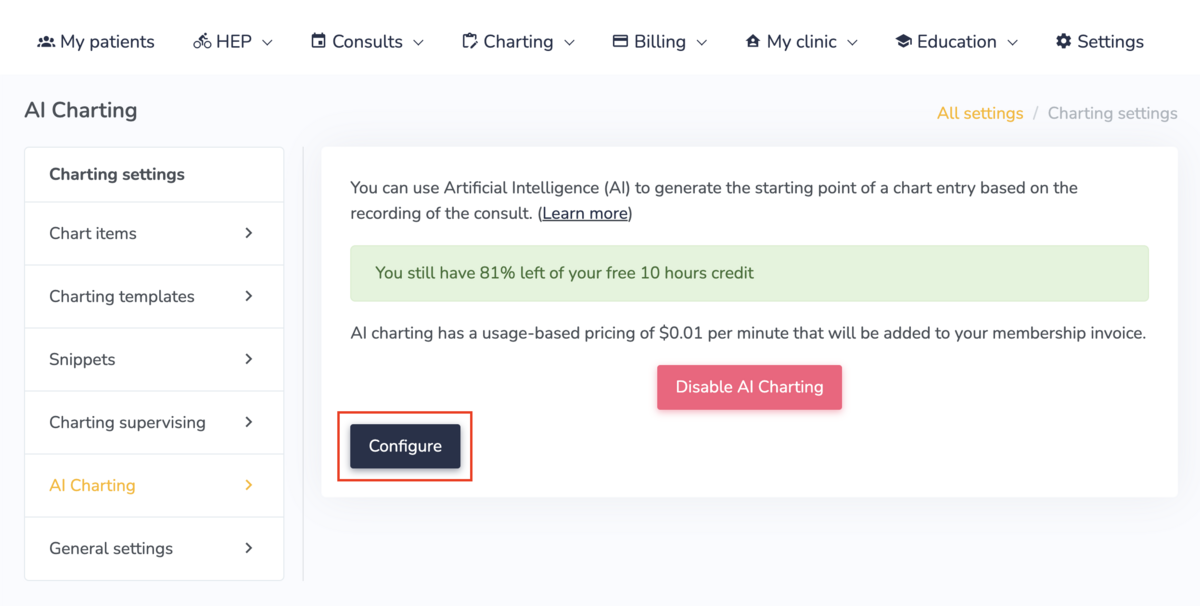
NOTE: One thing to know before you start is, whatever you enter replaces the default in full rather than adding to it. Anything you still want the AI to do has to be written into your version, including the instruction not to invent information and to leave a field blank when it can't confidently answer from the transcript.
If you don't wish to customize your clinic's prompt, simply leave the field empty to stick with the default.
Custom vocabulary
Below the general prompt on the same Configure screen is a Custom vocabulary field.
This one doesn't shape the note. Instead, it improves the transcript the AI is working from.
Transcription engines work from a standard dictionary, so anything outside it tends to come through incorrectly.
A misheard term doesn't just look untidy in the transcript; it carries straight into the chart draft, because the AI can only work with the words it knows.
Some vocabulary that might be worth adding to your account, based on how you practice:
- Outcome measures and their acronyms, such as LEFS, DASH, NPRS, ODI, WOMAC
- Manual therapy and technique names, such as Mulligan, Maitland, Graston, dry needling, IASTM
- Practitioner names, your clinic name, and the clinics or physicians you take referrals from
- Condition names, and anatomical terms specific to your caseload
- Equipment, product, or program names used in your sessions
How this fits with the prompts you already had
Every question in every chart item has always carried its own prompt, telling the AI what to extract for that specific field and how to phrase it. Those haven't changed. You'll still find them under Change LLM prompt when creating or editing a chart item.
What's different is that you now have a layer above them.
Start with the general prompt when you want to change the overall character of your notes across the clinic. Stay with question-level prompts when one specific field keeps coming back wrong.
As always, AI-generated chart content is a starting point, not a finished note. Better prompts mean less correcting. They don't remove the need to review before you sign.
🔒 Requires an active Tier 3: Practice Management membership. The general prompt and custom vocabulary are set by the clinic manager.
Learn more about customizing your AI prompts for charting →
Other Quick Updates on Embodia
Below are the two feature improvements we made this month. All available for Practice Management (Tier 3) members.
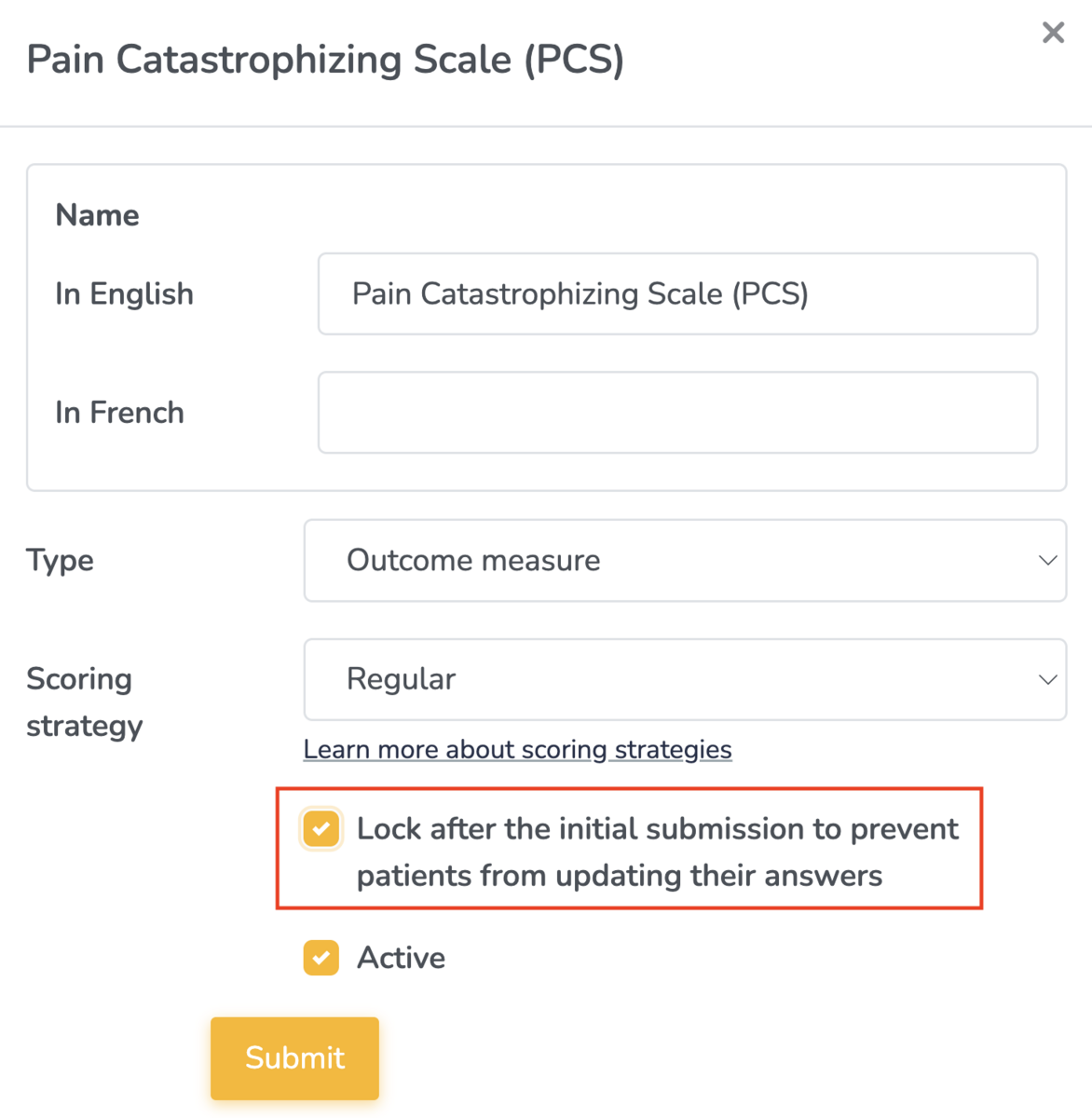
Lock patient questionnaires after the initial submission
You can now prevent patients from going back and changing their answers once they've submitted.
When creating a new questionnaire, or editing an existing one, just check "Lock after the initial submission to prevent patients from updating their answers."
Learn more about creating questionnaires on Embodia →
New time zones for Alberta and British Columbia
Both provinces are ending seasonal clock changes, and neither will fall back on November 1, 2026.
We've added two new time zones on Embodia to account for this:
- Mountain Time - Alberta
- Pacific Time - British Columbia
SUPPORT: We'll be reaching out to clinics in Alberta and B.C. to help with migrating to these new time zones. Updating will require changes across multiple areas, including the time zones for the clinic, each practitioner, each clinic admin, and any patients added prior to the update.
New in the Exercise Library: Unilateral Cable Exercises
As part of our new cable exercise collection, we’ve added a series of unilateral strengthening exercises specifically for the shoulder.
New additions include dynamic movements like the overhead press, horizontal abduction and adduction, shoulder extension, plus dedicated rotator cuff exercises, available in functional variations such as kickstand stances, isometric holds and eccentric biases.
These can help you deliver effective exercise progressions for patients moving through mid-to-late stages of shoulder rehabilitation.
The exercise versatility you need, whether you’re working with athletes, fitness enthusiasts, or everyday patients.
Embodia's video HEP library has what you need for patients looking to improve posture, build stability and control, and increase confidence in movement.
SAMPLE: Cable Kickstand 90/90 External Rotation to Overhead Press - Contralateral
🔒 Prescribing exercises requires an active Tier 2 or 3 membership, but you can view Embodia's HEP library with a free account
Learn more → Embodia for Home Exercise Programs
New in Patient Education: OAB, Prolapse, and Osteoporosis
Plenty new to explore this month!
Osteoporosis/Aging:
- What does Self-Care Look Like as We Age
- Osteoporosis and Menopause
- Sleep Difficulties Causes/Treatment
Prolapse:
- Understanding Prolapse
- What is Pelvic Physiotherapy
Overactive Bladder (OAB):
- Understanding Bladder Leakage
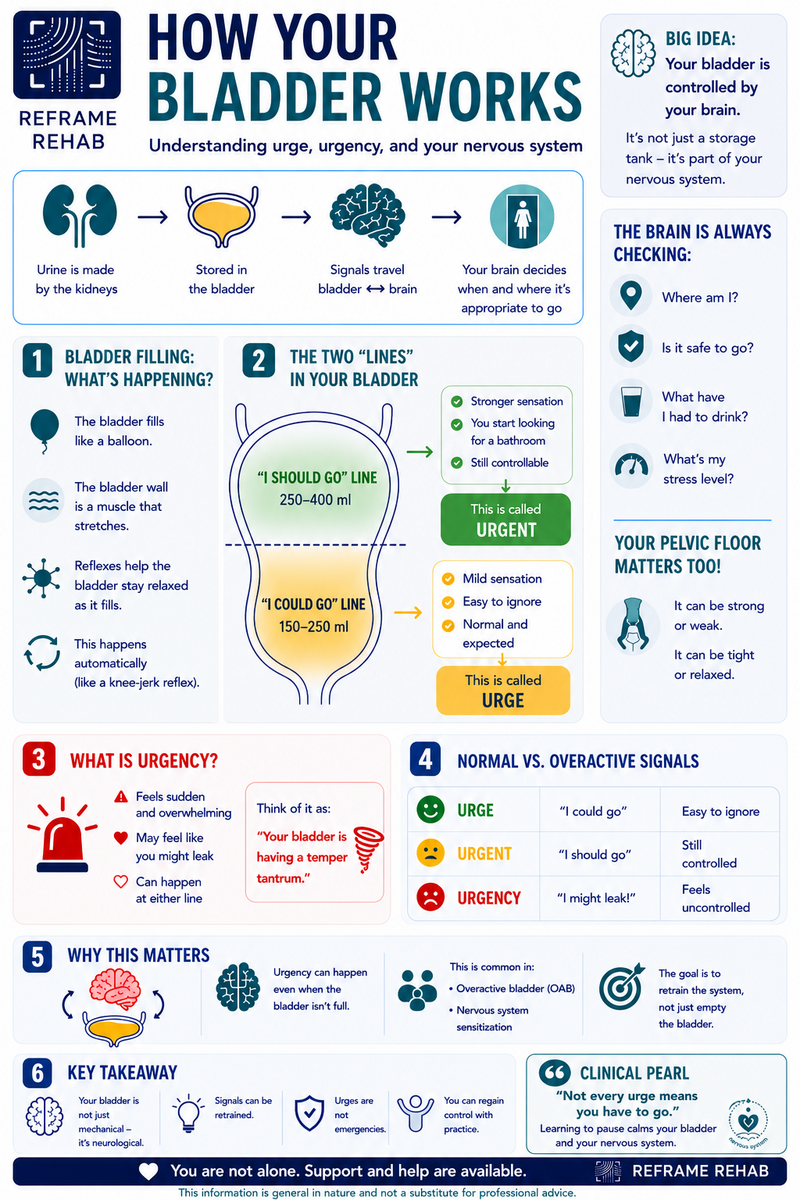
- Understanding Bladder Function and Urgency
- Bladder Urgency and OAB
SAMPLE: How Your Bladder Works
🔒 Sharing patient education requires an active Tier 2 or Tier 3 membership.
Learn more → Embodia for Home Exercise Programs
Don't miss key updates and deals
Embodia is built for you, the physiotherapist, occupational therapist, or allied health practitioner focused on excellence and growth.
Every month on our blog we share what's new on Embodia, clinical reads worth your time, and updates from the community.
Our email list shares these, continuing education discounts, live webinar announcements, promotions, and more. No spam. Real-time updates and deals worth your time.
If you're not already on the list, join below! You can opt into a few emails a month, or choose to receive blog emails only. Your call!